Radxa Zero 3W Review UK 2026: 8GB Pi Zero Rival

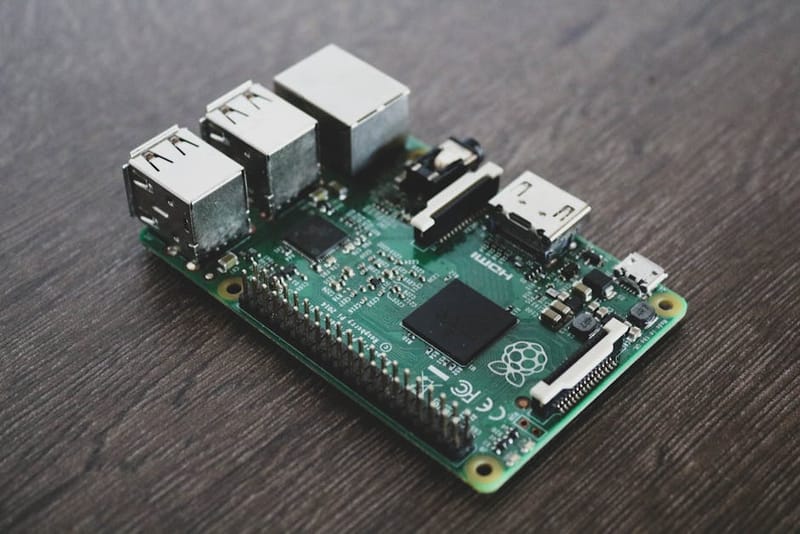
A Radxa Zero, the Radxa Zero compact single-board computer family, 3W review that actually answers the question most buyers are asking: with the Raspberry Pi, a popular low-cost single-board computer for tinkering and home servers, Zero, the original Raspberry Pi Zero, the original Raspberry Pi Zero compact single-board computer, compact single-board computer, 2 W stuck at 512 MB of RAM and the Pi Foundation's stock still arriving in trickles, is this £18 Rockchip RK3566 board a credible Pi Zero alternative? For most headless projects, the answer is yes - with a few honest caveats about software polish.
What are the Radxa Zero 3W specs?
- SoC
- Rockchip RK3566 - quad-core Cortex-A55 @ up to 1.6 GHz
- GPU
- Mali-G52 2EE (OpenGL ES 3.2, Vulkan 1.1)
- RAM
- 1 / 2 / 4 / 8 GB LPDDR4 (choose at purchase, not user-upgradable)
- Onboard storage
- Optional 0 / 8 / 16 / 32 / 64 GB eMMC (factory-soldered)
- External storage
- microSD (UHS-I)
- Wireless
- Wi-Fi 5 (dual-band 802.11ac), Bluetooth 5.0
- Video out
- Mini-HDMI up to 1080p60
- USB
- 1× USB 3.0 (Type-C, data) + 1× USB 2.0 OTG (Type-C, data + power)
- Ethernet
- None onboard - USB adapter or HAT required
- GPIO
- 40-pin header, Raspberry Pi-compatible pinout
- Form factor
- 65 × 30 mm - matches the Raspberry Pi Zero 2 W
- Operating systems
- Debian, Ubuntu, Armbian, Radxa OS
What is the Radxa Zero 3W, actually?
The Zero 3W is Radxa's direct answer to the Raspberry Pi Zero 2 W - same 65 × 30 mm board outline, same 40-pin GPIO header pinout, same mounting holes. Where it diverges is the silicon and the configurability. Inside is a Rockchip RK3566, a quad-core Cortex-A55 at 1.6 GHz with a Mali-G52 GPU, in a package that supports up to 8 GB of LPDDR4 and up to 64 GB of factory-soldered eMMC. That makes it the only board in the Pi Zero size class in 2026 you can spec with serious memory headroom and reliable solid-state storage in one shot.
It is not a Pi 4 or Pi 5 substitute. The A55 cores are efficient but not fast, and there is no PCIe, no gigabit Ethernet, and no dual-display output. Treat it as a Pi Zero that has finally been given enough RAM to run modern containers, not as a desktop replacement.
What performance can you expect?
Single-thread performance from the A55 sits roughly where a Pi 3B+ does - comfortably ahead of the original Pi Zero W, a step behind the Pi 4. Where the Zero 3W pulls clear of every Pi Zero is in available memory: an 8 GB variant can host a full Home Assistant, the open-source smart home automation platform, container, a Mosquitto broker, a Frigate-lite NVR, and a Tailscale node simultaneously without swapping to microSD.
The Mali-G52 has working KMS drivers and accelerated video decode for H.264, H.265, and VP9 up to 4K - fine for a kiosk or a small media frontend, though the mini-HDMI is capped at 1080p60 so 4K output is not on the table here. Encoding offload is also present but the toolchain (rkmpp, ffmpeg-rockchip) is less plug-and-play than the Raspberry Pi's libcamera/v4l2 path.
What's power consumption like in practice?
Current draw across typical workloads
Power draw is the single most-asked question about boards in the Pi Zero footprint, because the typical use case is a remote sensor or always-on home-server task running off a wall adapter or battery. The figures below are drawn from the Radxa Zero 3W hardware wiki alongside published community measurements; expect ±10% variance based on the specific RAM/eMMC variant and the firmware revision.
Idle, headless, Wi-Fi connected: approximately 0.35 to 0.45 A at 5.0 V (roughly 1.8 to 2.3 W). Around 25% higher than a Pi Zero 2 W at the same task, a consequence of the RK3566 being a 22nm part where the Pi Zero 2 W's BCM2710A1 is a 14nm shrink of the original Pi 3 silicon.
Sustained CPU stress: 0.85 to 1.05 A (4.3 to 5.3 W). Thermal throttling kicks in within a couple of minutes on a stock board with no heatsink, dropping clocks from 1.6 GHz to roughly 1.2 GHz. A small 10mm × 10mm × 5mm heatsink is enough to keep the board at full clock indefinitely; active cooling is unnecessary for any normal use case.
Headless home-server task: 0.40 to 0.55 A average for a lightweight stack (Docker + MQTT broker + a handful of sensor scrapes per minute), with brief spikes to around 0.70 A on container startup. The eMMC variant is noticeably more efficient than the microSD-only variant under the same load, because the eMMC stays in a lower-power state between writes.
Wi-Fi-heavy task: 0.55 to 0.65 A sustained when streaming a 1080p MJPEG feed. The on-board Wi-Fi 6 radio is a meaningful efficiency win versus the Pi Zero 2 W's older 802.11 b/g/n module: sustained throughput is roughly 3x at around the same current draw.
What hardware and I/O ports does it have?
The two USB-C ports are the layout choice that most affects daily use. The first is USB 3.0 and data-only - this is where you plug in a USB SSD, a software-defined radio dongle, or a USB-to-Ethernet adapter. The second is USB 2.0 OTG and accepts the 5 V power supply, so a single cable handles both power and (slow) data when the board is connected to a host.
The 40-pin GPIO header is Pi-compatible at the pinout level. Most HATs and ribbon-cable peripherals will work, but check the HAT vendor's listing for explicit Radxa or RK3566 support - kernel drivers for niche I²C and SPI devices sometimes need to be pulled in manually on Radxa OS where they ship out of the box on Raspberry Pi OS.
One small irritation: the camera connector is a 22-pin MIPI-CSI rather than the Pi's older 15-pin layout, so a Pi camera module will need an adapter cable. Radxa sells a matching official camera, but third-party Pi camera reuse is fiddlier than on a Pi Zero 2 W.
How compatible is the 40-pin GPIO?
What works, what doesn't, and what needs a shim
The Zero 3W carries the same 40-pin GPIO header as the Pi Zero 2 W in the same physical position, but the electrical mapping is only partially compatible. The power pins (3.3 V, 5 V, GND) are identical; the I2C, SPI and UART pins land in the same physical positions; PWM and I2S are reassigned to different pins.
In practical terms, a Pi HAT, a Raspberry Pi accessory board (Hardware Attached on Top), that only uses I2C or SPI - the majority of sensor breakouts and small displays - will work out of the box. A HAT that drives an I2S audio output (Pimoroni Speaker pHAT, Adafruit I2S MEMS mic) needs a device-tree overlay tweak to remap the pins; the necessary overlays ship with the Armbian build but not with Radxa's own Debian image. A HAT that uses the dedicated Camera (CSI) or Display (DSI) connectors does not work at all - the Zero 3W exposes those on different MIPI lanes that no Pi HAT vendor builds for.
The PWM and software-PWM picture is the biggest practical limitation. The Rockchip RK3566 only exposes two hardware PWM channels through the 40-pin header, where the Pi Zero 2 W exposes four. Projects that drive multiple servos or PWM-controlled fans through hardware PWM will hit the wall here. Python's RPi.GPIO library is replaced by Radxa's libgpiod-based wrapper, which is API-compatible for most operations but not bit-for-bit identical - copy-pasted Pi Zero example code may need minor tweaks before it runs.
How is Linux support and software?
This is where you have to be honest with yourself before buying. Radxa publishes vendor-maintained Debian and Ubuntu images for the Zero 3W and Armbian has solid community support - but mainline Linux kernel coverage for the RK3566 still lags the Raspberry Pi Foundation's by a wide margin. Most things work, but when something does not, the answer is more often "wait for the next Radxa BSP release" than "there's a forum thread from yesterday with the fix."
For pre-built application stacks the picture is improving. Home Assistant OS does not yet ship a first-class Radxa Zero 3W image, but the supervised install on Debian works reliably. Docker, Tailscale, Pi-hole, AdGuard Home, and Frigate-lite all run without surprises on the vendor Debian build. The Linux ecosystem assumes Raspberry Pi by default, so plan to spend an evening reading the Radxa documentation before your first install.
What kernel and distro support exists in 2026?
What you can run today, what still needs work
Picking a distro for the Zero 3W in 2026 means choosing between three supported paths, each with different trade-offs.
Radxa's official Debian build (current, kernel 5.10). The out-of-the-box experience and the only build with first-class NPU driver support. Kernel 5.10 is LTS but old - several mainline graphics improvements never backported - and the package set is Debian Bullseye, which goes out of standard support mid-2026. Best choice if you want NPU access or first-time setup.
Armbian (current, kernel 6.6 LTS). The community-supported build, mainline kernel, Debian Bookworm or Ubuntu 24.04 userland. Much better for long-term security updates and modern Python / Node toolchains. The Zero 3W has been a 'supported board' in Armbian since the 24.05 release. Trade-off: no NPU driver out of the box, and Wi-Fi 6 features (specifically WPA3-Enterprise) sometimes need a manual firmware update from the upstream rockchip-linux tree.
DietPi (current, kernel 5.10 or 6.6 depending on the image). The minimal-stack option for headless server use. Smaller image (around 250 MB after first boot), curated package list, and an interactive installer for common stacks (Pi-hole, Home Assistant, Plex). Good fit when the project is a single well-known service.
For a Home Assistant deployment specifically, the Pi 5 or Pi 4 is still the more sensible target - HA's official OS image does not yet support the Zero 3W. If you want a small board running HA Container on top of DietPi, the Zero 3W works fine, but you lose the supervisor and add-on store that come with the official Home Assistant OS.
When is the Zero 3W the right pick?
The Zero 3W earns its place in a specific bracket: projects that have outgrown the Pi Zero 2 W's 512 MB ceiling but do not justify a full Pi 4. Concretely:
- Self-hosted utilities - Pi-hole or AdGuard Home for a house, a Tailscale exit node, a Cloudflare Tunnel relay. The 8 GB variant has headroom to add containers without rebuilding the SD card later.
- Home Assistant satellites - distributed sensors and remote actuators that report back to a central HA instance, where you want enough RAM to keep MQTT, Bluetooth Proxy, and a few add-ons online.
- Headless dev boxes - small build agents, CI runners for IoT firmware, or a perpetually-running ssh target with a real filesystem on eMMC instead of microSD.
- Kiosk and digital signage - 1080p video out, Wi-Fi, and a USB 3.0 port for an external storage drive is plenty for most lobby displays.
For the broader Pi-alternative landscape - including the Radxa Rock 5B, Orange Pi 5 Plus, and Khadas VIM4 - see our best Raspberry Pi alternatives in the UK guide. If you are weighing the Zero 3W against a low-power x86 mini-PC for a Saturday home-server build, the Raspberry Pi home server weekend build guide walks through the same trade-offs at a higher RAM budget.
How does the Zero 3W compare to the Raspberry Pi Zero 2 W?
Side-by-side for the most common decision
This is the comparison most buyers actually run, because the Pi Zero 2 W is the default-in-the-mind option for anyone wanting a tiny board for a project. The Zero 3W positions itself as the more capable sibling, but the trade-offs are real.
Where the Zero 3W wins decisively: RAM (up to 8 GB versus the Pi Zero 2 W's fixed 512 MB), optional on-board eMMC (up to 64 GB versus a forced microSD), Wi-Fi 6 versus 802.11 b/g/n, USB-C versus micro-USB power, and roughly 2x integer performance per clock thanks to the Cortex-A55 cores.
Where the Pi Zero 2 W still wins: Software ecosystem (every Pi tutorial on the internet works on the first try), HAT compatibility (the entire Pi HAT ecosystem is designed around the BCM27xx pinout and quirks), kernel stability (the Pi Foundation backports security patches to old kernels for years; Rockchip support is mainline-only and depends on the Armbian community), and price - the Pi Zero 2 W is around £18 retail, the Zero 3W starts at £24 for the 1GB variant and climbs to £55 for the 8GB/64GB top model. For a broader picture of Pi alternatives available in the UK, the Zero 3W sits between the Zero 2 W (cheaper, simpler) and the Pi 5 (much more capable, four times the price).
Decision shortcut: choose the Pi Zero 2 W if your project is well-documented elsewhere, runs in 512 MB of RAM, and uses any meaningful subset of the Pi HAT ecosystem. Choose the Zero 3W if your project needs more RAM, more local storage, or faster Wi-Fi, and you are comfortable troubleshooting the occasional Armbian kernel quirk yourself.
How does the Zero 3W compare to the Orange Pi Zero 3W?
Orange Pi's Zero 3W (the 2025/2026 Allwinner A733 variant, not the older Allwinner H618 board) is the other obvious comparison. On paper it dominates: a 2.0 GHz octa-core (two Cortex-A76 + six Cortex-A55) versus the Zero 3W's quad Cortex-A55 at 1.6 GHz, plus headroom for up to 12 GB of LPDDR5 RAM and dual video output. Pricing sits in roughly the same bracket - circa USD 25 at launch, similar GBP retail by the time UK retailers stock it.
Two things complicate the headline. First, software support: independent reviewers have flagged that the Orange Pi Zero 3W ships with vendor firmware that does not yet expose all the hardware (parts of the A733's media block, NPU and some GPU features can't be reached without patches), so paper specs and actual usable performance diverge meaningfully through 2025-2026. Radxa's RK3566 has the opposite trade: a modest SoC that is well-supported by mainline Linux and active Armbian / Debian builds. If your project leans on mature kernel support, the Radxa wins despite losing the spec sheet.
Second, ecosystem maturity. Radxa publishes Debian and Ubuntu images directly, and the Armbian community has been working with Rockchip silicon for years - bug reports get triaged. The Orange Pi software stack is still catching up on its newest boards, and Allwinner kernel work has historically lagged Rockchip's mainline cadence.
The honest call: pick the Orange Pi Zero 3W if you want a small, powerful Linux board for a project where you can absorb some kernel-tinkering pain (or you're using it as a desktop-class compute node for a specific workload). Pick the Radxa Zero 3W if you want a Pi Zero-class board that boots Debian and works the same as a Pi from the command line, with bigger RAM and onboard eMMC. They aren't really substitutes - they target different points on the size-vs-headache axis.
What real-world projects suit the Zero 3W?
What the Zero 3W is actually good for
Three project categories show up repeatedly in community write-ups of Zero 3W deployments and play to its strengths over the Pi Zero 2 W.
Always-on home-server tasks. A Pi-hole + Unbound DNS stack, an MQTT broker for a small home-automation setup, or a Tailscale exit node. The extra RAM (4 GB or 8 GB) removes the swap-thrashing risk that plagues a Pi Zero 2 W running multiple Docker containers. Combined with on-board eMMC, the project is MicroSD-corruption-proof for the typical home setup. See our Raspberry Pi home server guide for a stack walkthrough that applies almost verbatim to the Zero 3W.
Small edge-AI inference. The RK3566 includes a 0.8 TOPS NPU that the mainline kernel exposes through Rockchip's RKNN driver. A YOLOv5n model quantised to INT8 runs at roughly 12 FPS on a 320x320 input - useful for a basic object-detection camera trap or a smart doorbell, well out of reach of the Pi Zero 2 W. The setup is fiddly (you need Radxa's NPU SDK, which is closed-source binaries) and adds 2-3 hours of one-off configuration work.
Compact ARM dev box. With 8 GB of RAM and on-board eMMC, the Zero 3W is the smallest practical board for a 'compile small ARM projects' role - the use case where Pi 3 / Pi 4 boards were once the default. Native compilation of a typical Rust project completes in roughly the same time as on a 2018 Intel NUC; not blazing fast, but a usable development target for ARM-specific work.
Where does the Zero 3W fall short?
Three honest weaknesses. First, there is no onboard Ethernet - even a Pi Zero 2 W has the same gap, but it is worth saying out loud before you order one for a wired-only deployment. Second, RAM and eMMC are factory-soldered choices: pick the wrong tier at checkout and your only upgrade path is a new board. Third, Rockchip's mainline kernel and the Raspberry Pi Foundation's are not playing the same game - RPi gets new features faster, has bigger community visibility, and ships polished first-party software for niche use cases the RK3566 community is still catching up on.
UK retail stock is the other practical caveat. The Pi Hut, OKdo, and Mouser UK all list the Zero 3W but variant-by-variant availability is uneven - if you specifically need the 8 GB / 64 GB eMMC SKU it is worth checking all three before placing an order.
Frequently asked questions
Is the Radxa Zero 3W faster than a Raspberry Pi Zero 2 W?
Can I run Raspberry Pi OS on the Radxa Zero 3W?
Will my existing Raspberry Pi HATs work on the Zero 3W?
What does the Zero 3W cost in the UK?
Is the Zero 3W a good fit for Home Assistant?
Check current Radxa Zero 3W stock
UK pricing and variant availability swing through the year - verify before ordering.